quarta-feira, outubro 12, 2022
Teste de RAM Apple II - Bancos de 0 a 3 (primeiros 16kb)
Em 2013, restaurei um Unitron com a ajuda do querido Lisías, que, na ocasião, mandou um programinha muito simples para testar o primeiro banco de ram.
De tempos em tempos, bato a cabeça procurando o código - que acabei gravando em um disquete - e hoje, tomei vergonha e fui buscar o tal programa.
Do prompt do basic, acessar o monitor:
] CALL -151
A partir daí, é inserir o seguinte:
*300:A2 00 8E 00 02 EC 00 02
D0 22 E8 D0 F5 EE 03 03
EE 06 03 D0 ED CE 04 03
CE 07 03 10 E3 A2 00 A0
10 8E 30 C0 E8 D0 FD 88
D0 FA F0 F3 A2 00 8E 30
C0 CA D0 FD F0 F8 00 00
E para rodar,
*300G
O programa faz parecer que está tudo travado, mas ele vai até o final e bipa. Se tiver algo de errado vai mostrar ERR na tela.

Importante: esse programa acaba se destruindo depois de rodar, pois testa, inclusive, a ram aonde foram digitados os códigos. Para rodar ele novamente, a máquina precisa ser resetada e redigitado.
Qualquer dúvida, é só deixar comentário!
Abraço,
BBK.
Marcadores: Apple ][, Retrocomputação

domingo, junho 24, 2018
Apple II SSM Microcomputer Products Inc AIO II (All-in-One)
This post is an attempt to obtain and consolidate information for the SSM Micromputer Products All-in-one (AIO) II serial and parallel board here under.
I dug the web as hard as I could but came almost empty handed with information on this board - the last manual on sale was about a year from today, and I have missed it.
What I know so far about the jumpers:
A: activates Auto Line Feed*
B: could be related to printing/buffering*
C: no info so far
D: no info so far
E: could be related to printing/buffering*
F: no info so far
G: no info so far
Interrupt: no info so far
P4 P20: no info so far
Ram Rom: no info so far (IC type ?)
Baud Rate set: no info found - as far I could get, could be changed via software.
* as found on Transcend Bufferlink instruction manual.
If you have any additional info on this board that you can share, please, either drop a comment or post at Apple II Enthusiasts Facebook Group ( https://www.facebook.com/groups/5251478676/ ).
Any info with be greatly helpful into finding all jumper setting for this board!
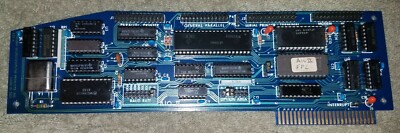
Information obtained from Softerm instruction manual:
"SSM AIO II Serial & Parallel Apple Interface
The SSM AIO II Serial and Parallel Apple Interface can be specified in Softerm as the serial communications interface by entering SSM AIO II.SIO for the serial I/O driver when generating a configuration in terminal setup. It can also be specified as the printer interface by entering SSM AIO IlPIO as the printer driver.
The SSM AIO II provides a serial interface and two parallel interfaces. The serial interface uses connector J3 for printers and connector J4 for modems and is specified in the serial I/O or printer driver parameters as PORT I. A general purpose parallel connector is provided on J2 corresponding to the AIO II Parallel Port A referenced in Softerm as PORT 2. A Centronics parallel printer connector is provided on Jl corresponding to the AIO II Parallel Port B referenced in Softerm as PORT 3. Softerm allows the serial interface to be used for serial communications concurrently with a printer on one of the two parallel interfaces.
The serial interface provides all required modem signals and allows DTR to be used as the printer busy indicator if jumper option P20 is installed for connector J3. Although jumpers are provided to select the baud rate, the selection is also a programmable feature of the AIO II and Softerm selects the baud rate by software according to the value specified in terminal setup. The speeds which may be selected are llO, 134.5, 300, 1200, 2400, 4800, and 9600.
The two parallel interfaces provide 8 data, 1 strobe, and 1 acknowledge line. The polarity of the strobe and acknowledge signals is controlled by software and will be set according to the printer driver parameters specified in terminal setup. "
Best,
BBK
Marcadores: Apple ][, Retrocomputação
sábado, dezembro 26, 2015
Apple II ProDOS Crack Address
To make ProDOS to continue loading, you have to CTRL+C and get to the Monitor Prompt (*) and then change the address of certain parts of the Memory for bytes EA. For example, on ProDOS v1.9, you have to change address $2865. This address changed from version to version of ProDOS. So, as long as I keep discovering those address, I'll add up to this list.
After doing this change, 2000G will continue to load the OS.
Example commands for V1.9:
(Ctrl+C)
* 2865:EA EA (Return)
* 2000G (Return)
And here follows the list of address to be changed using the expression above:
Version Year Address
v1.0 Aug83 25FD
v1.0 Sep83
v1.0 Oct83
v1.0 Nov83
v1.0.1 Jan84 265B
v1.0.2 Feb84
v1.1 Aug84
v1.1.1 Sep84 269E
v1.2 Sep86
v1.3 Dec86
v1.4 Abr87 282B
v1.5 Abr88 282B
v1.6 Jun88 282B
v1.7 Aug88 282B
v1.8 May89 2836
v1.9 Jun90 2865 --- Last version compatible with 6502 (Apple II and II+)
v2.0 Jan92
v2.0.1 Mar92
v2.0.2 Nov92
v2.0.3 May93 2836
And how about those missing versions? Well the work goes into finding where are bytes D0 03. Find those guys in such address and change them for EA EA and you are good to go! Feel free to add them in the comment box and I'll add to this post.
Certainly you can also get more info on this on forums such as "Apple II Enthusiasts" or even Facebook. As for myself, I get annoyed for Googling this info and never having it at hand.
Keep it Rocking!
RC
Marcadores: Apple ][, Retrocomputação
